
Shopify Payments is one of the most popular payment gateways for Ecommerce sellers thanks to its seamless Shopify integration, easy management, and support for a wide range of payment methods. However, with these advantages comes increasingly strict risk management and compliance procedures.
Many sellers have received emails from Shopify Payments requesting additional documentation to verify their business operations. These verification requests typically involve business registration, inventory, product sourcing, shipping records, or proof of actual business activities.
For new sellers, this process can be stressful. However, if you understand what Shopify is looking for and prepare your documents correctly, the review process is usually much smoother. In this article, EasyPay OnBoard shares practical experience to help Ecommerce sellers prepare a complete and professional Shopify Payments verification package.
Why Does Shopify Payments Request Inventory Verification?
Many sellers assume that only problematic accounts are subject to verification. In reality, Shopify Payments may request additional documentation in various situations, including:
- Sudden spikes in sales volume
- New stores generating a high number of orders
- Selling products in high-risk industries
- Increased refund, chargeback, or dispute rates
- Routine account compliance reviews
- Unclear product sourcing or business models
The goal is to ensure that merchants operate legitimate businesses, have access to genuine inventory, and can fulfill customer orders while complying with anti-fraud and financial regulations.
If you fail to respond or provide insufficient documentation, Shopify Payments may place payouts on hold, restrict your payment processing capabilities, or request multiple rounds of verification.
1. Proof of Business Association
This is typically the first document Shopify Payments requests.
Its purpose is to verify that your business is legally registered and that you are authorized to represent the company.
Accepted Documents
For LLCs:
- Certificate of Formation
- Certificate of Organization
- Articles of Organization
For Corporations:
- Articles of Incorporation
- Certificate of Incorporation
You may also provide:
- Business License
- EIN Confirmation Letter
- State Registration Documents
Important Notes
Your information should be consistent across:
- Shopify Store
- Shopify Payments account
- Business bank account
- Business registration documents
One of the most common reasons for rejection is inconsistent information between documents.
2. Proof of Inventory
After verifying your business, Shopify typically wants to know where your products come from.
This is often the most challenging part for many sellers.
Shopify wants to confirm that your products come from legitimate suppliers rather than unknown or unverifiable sources.
What Should You Prepare?
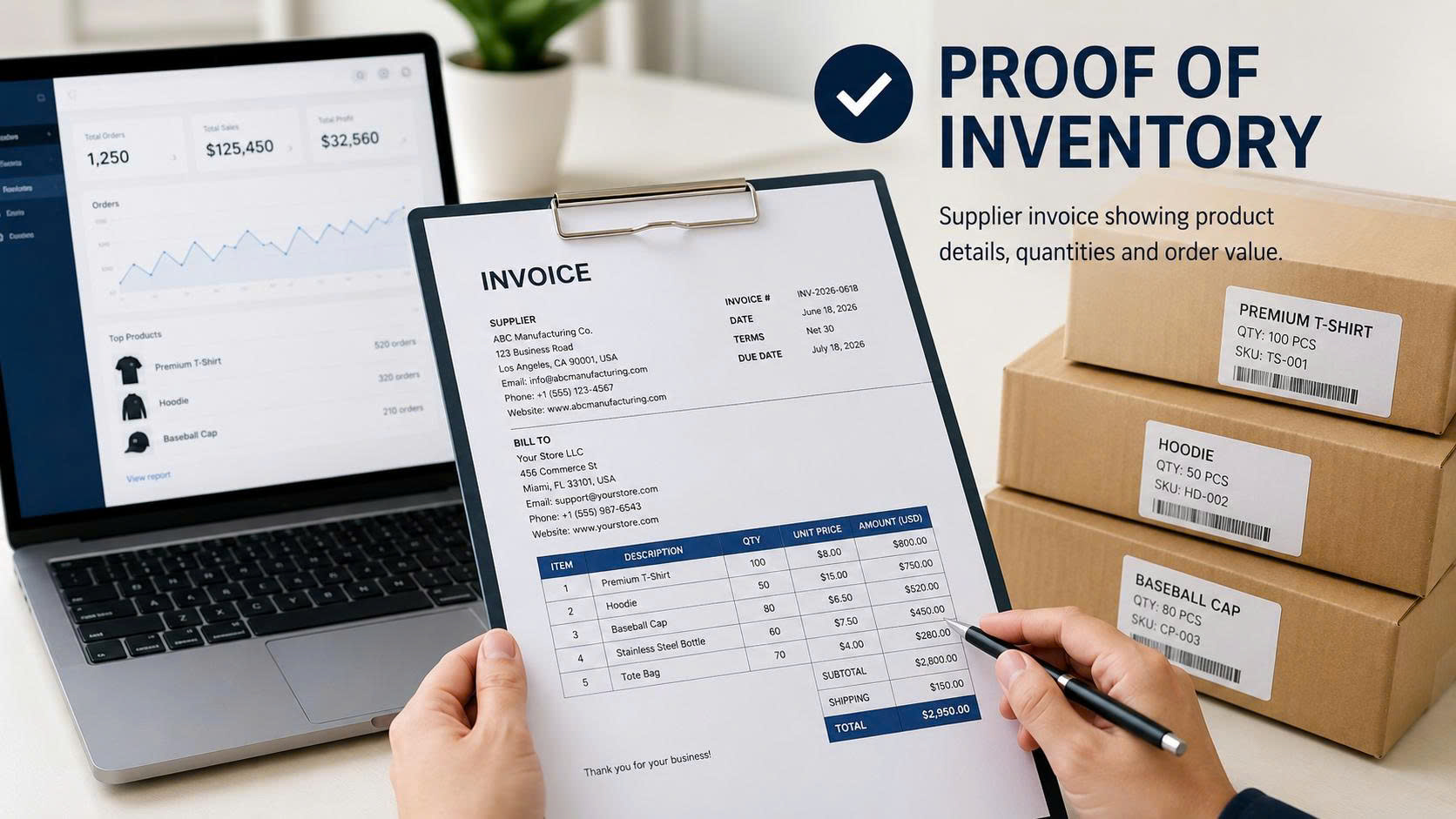
Provide supplier or manufacturer invoices.
Supplier Information
Invoices should clearly include:
- Company name
- Business address
- Website
- Email address
- Phone number
Your Business Information
Include:
- Company name
- Business address
- Website
- Email address
- Phone number
Product Information
Your invoice should clearly show:
- Product names
- Quantities
- Unit prices
- Total order value
- Invoice date
Common Mistakes
- Missing supplier information
- No website or contact details
- Generic product descriptions
- Excessively edited invoices
- Missing product quantities
The more transparent your inventory source is, the higher your chance of approval.
3. Shipping Information
Shopify also wants proof that your business is actually shipping products to customers.
This demonstrates that your store is conducting legitimate business operations.
Option 1: Submit Delivered Orders
You can provide completed orders from your Shopify Admin.
Tracking numbers should be:
- Valid
- Trackable
- Showing successful delivery status whenever possible
Option 2: Export an Order Report
Many sellers submit a report containing approximately ten recently delivered orders.
Example:
| Order ID | Carrier | Tracking Number |
|---|---|---|
| #1001 | USPS | 9400xxxx |
| #1002 | UPS | 1Zxxxx |
| #1003 | YunExpress | YTxxxx |
You can export this report from:
Shopify Admin → Orders → Export
Then filter orders containing tracking information and save the report as a PDF or Excel file.
Common Shipping Carriers:
- USPS
- UPS
- FedEx
- DHL
- YunExpress
- Cainiao
- 4PX
Clear and verifiable shipping records generally help speed up the review process.
4. Social Media Links
Many sellers focus only on documentation and overlook their social media presence.
In reality, active social channels are valuable trust signals that help Shopify evaluate your brand’s credibility.
Recommended Platforms
- Facebook Page
- TikTok
- YouTube
What Shopify Wants to See
- Active social media accounts
- Content related to your products
- Branding consistent with your website
- Links pointing to your store’s domain
If your Facebook or TikTok advertising campaigns are connected directly to your website, this can further strengthen your credibility during the review process.
A complete brand ecosystem is generally viewed as more trustworthy than a standalone website.

5. Comment Box
After uploading your documents, Shopify usually provides a Comment Box where sellers can include additional information.
Many merchants leave this section blank.
That is a missed opportunity.
The Comment Box allows you to help the review team better understand your business.
What You Should Include
- A brief introduction to your business
- Your industry or product category
- Your business model
- A list of the documents submitted
- Explanations for any missing documents, if applicable
Tips to Improve Your Shopify Payments Approval Rate
Before submitting your documents, make sure the following items are in order:
- All information is consistent across every document.
- Your website is fully functional.
- Products are clearly displayed.
- Shipping Policy is available.
- Refund Policy is clearly stated.
- Contact information is complete.
- Shipping tracking numbers are valid and trackable.
- Supplier invoices are legitimate and complete.
Don’t wait until Shopify requests verification before preparing these documents. Keeping them organized in advance allows you to respond quickly whenever verification is required.
Conclusion
Receiving an inventory verification request from Shopify Payments is a normal part of operating an international payment account. It does not necessarily indicate that your account has a problem. Rather, Shopify simply wants to ensure that merchants operate transparent businesses and can fulfill customer orders legitimately.
A complete verification package including business registration documents, supplier invoices, shipping records, active social media profiles, and a clear business explanation can significantly improve your chances of a smooth and successful review.
For ecommerce sellers, building a transparent and well-organized business from the beginning not only helps you pass Shopify Payments verification but also lays a strong foundation for working with international payment gateways such as Stripe, PayPal, and Shopify Payments as your business grows.
EasyPay onBoard – Your success is our satisfaction